
Mobile App for iOS & Android

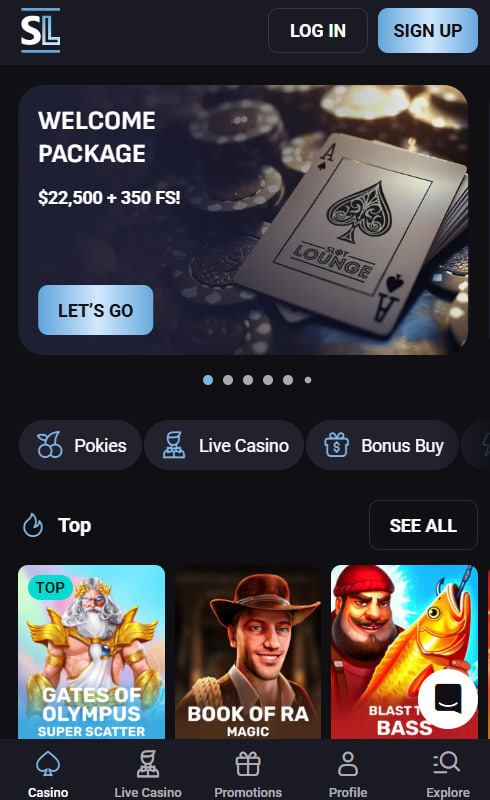
SlotLounge keeps the mobile experience light, fast and friendly through a Progressive Web App that lives right on the home screen of any modern phone or tablet. There's no Apple App Store search, no Google Play download and no lengthy install — just a couple of taps in the browser and the casino icon settles in next to favourite apps, ready for play. Inside, the entire SlotLounge lobby comes along — every pokie, every live table, every promo code and the 24/7 live chat. This page walks through the install steps for Android and iPhone, plus tips for mobile play.
What Makes the SlotLounge App Different
The SlotLounge app is a Progressive Web App, often shortened to PWA. Instead of building two separate native apps, the casino runs a single smart web app that behaves just like one. The icon goes on the home screen, the casino opens in full-screen mode without a browser bar, and updates happen automatically. The friendly side effect is a much lighter footprint — typically under 10 MB compared to 50–150 MB for a native casino app — and zero waiting for App Store approvals when new games or features land.
How to Install SlotLounge on Android
Android players using Chrome or Samsung Internet can get the SlotLounge app onto the home screen in under a minute. The steps are clean and the prompt usually appears automatically on the first visit.
- Open the browser (Chrome or Samsung Internet) and navigate to slot-loungecasino.com.
- Tap the three-dot menu in the top-right corner of the browser window.
- Select "Add to Home Screen" (some browsers show "Install app" instead — both work the same).
- Confirm the install by tapping the Install button in the small popup that appears.
- Find the icon on the home screen alongside other apps, ready for a tap-to-play launch.
If the "Add to Home Screen" option isn't visible, a quick browser update usually solves it. There's no need to hunt for an APK from third-party websites — those files are not official and can carry security risks.
How to Install SlotLounge on iPhone
iPhone and iPad users follow a slightly different path because Apple's PWA installation runs exclusively through Safari. Chrome on iOS doesn't support home-screen install, so Safari is the friend here.
- Open Safari (not Chrome) and visit slot-loungecasino.com.
- Tap the Share icon — the small square with an upward-pointing arrow in the bottom navigation bar.
- Scroll down in the share sheet and tap "Add to Home Screen".
- Edit the name if desired, then tap "Add" in the top-right corner.
- Open the new icon from the home screen — the casino launches in full-screen mode, with no Safari URL bar.
What's Available in the Mobile App
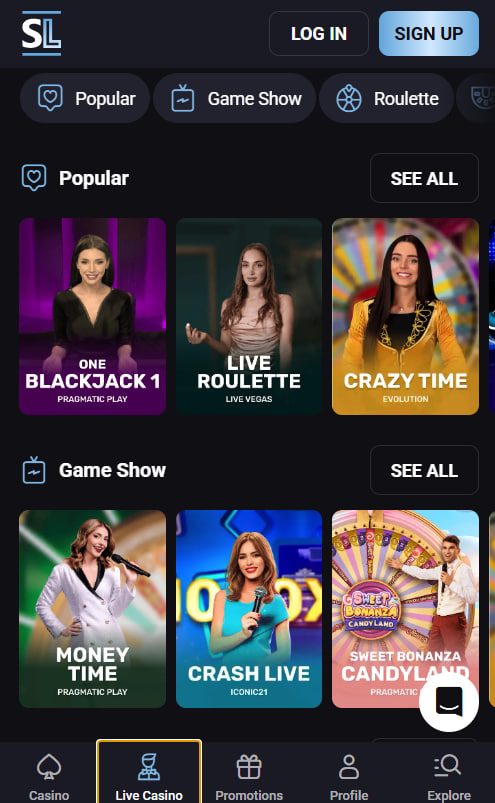
The SlotLounge mobile app is a full lobby in the player's pocket — every game, every banking method and every promo, with a touch-friendly layout that scales smoothly between phones and tablets.
- All 4,000+ games including pokies, live dealer tables, game shows and jackpot titles
- Full cashier with all deposit and withdrawal methods, including crypto
- Bonus claiming with one-tap entry of promo codes such as FIRST, SUNDAY and UNLIM25
- 24/7 live chat built straight into the bottom corner of every screen
- Account management for KYC document upload, deposit limits and responsible gambling tools
- Push notifications for new bonuses, tournament invites and withdrawal updates (opt-in)
New players can create an account straight from the app, while returning members can dive into the latest bonus calendar with a single tap from the home screen.
System Requirements and Tested Devices
The SlotLounge PWA works on virtually every modern smartphone and tablet, with low hardware demands and a smooth experience even on mid-range devices.
Supported Platforms
| Platform | Minimum Version | Recommended Browser |
|---|---|---|
| Android | 8.0 (Oreo) or later | Chrome 80+ or Samsung Internet 12+ |
| iOS | 14.0 or later | Safari (Chrome iOS not supported for install) |
| iPadOS | 14.0 or later | Safari |
| Connection | 4G / 5G / Wi-Fi | 5+ Mbps for live dealer HD |
Troubleshooting Common Issues
Most mobile hiccups have quick fixes. The table below covers the friendly first steps that usually solve things in seconds.
Quick Fixes
| Issue | Friendly Fix |
|---|---|
| App icon missing after install | Re-install via Add to Home Screen and check the second home screen page |
| Games not loading | Clear the browser cache and toggle Wi-Fi off and on |
| Cannot install on iOS | Make sure Safari is being used, not Chrome — iOS PWA install only works via Safari |
| Live dealer video lagging | Switch to a lower video quality in the in-game settings menu |
| Push notifications not arriving | Enable notifications in the device settings for the SlotLounge icon |
For anything not covered above, the 24/7 live chat is always one tap away inside the app — the team usually replies within five minutes.

Augustus Tremayne
Augustus Tremayne reports on SlotLounge Casino at slot-loungecasino.com, the 5th Hollycorn N.V. brand in the AU series launched in 2025 under Curaçao OGL/2023/176/0095 (shared with SpinRise and Lucky Vibe). Covers the 4,000+ titles from Pragmatic Play / Evolution / NetEnt / BGaming / Playson / Hacksaw / Nolimit City / Yggdrasil / Push Gaming, the A$22,500 + 350 FS welcome over four deposits with FIRST/SECOND/THIRD/FOURTH codes, 5% crypto no-wagering bonus, 25-tier VIP with Rolex Sky-Dweller top tier, AUD-native banking with crypto 24h withdrawals, and Progressive Web App mobile under 10 MB.